Gadgets

Microfon Studio: Complete Guide to Choosing the Right Studio Microphone

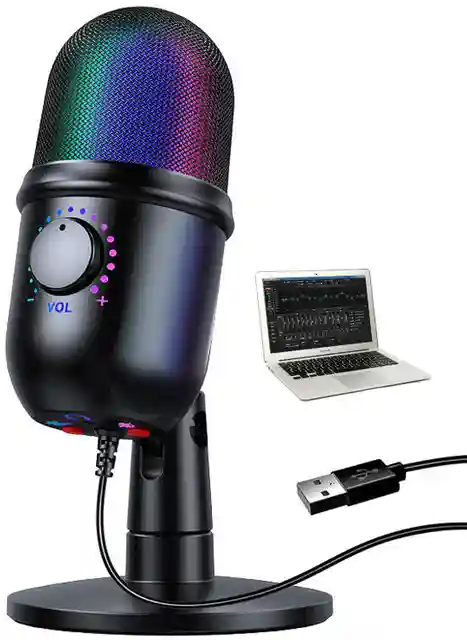
A microfon studio is one of the most important pieces of equipment for anyone who wants to create high-quality audio recordings. Whether you are a singer, musician, podcaster, YouTuber, voice-over artist, streamer, or music producer, choosing the right microphone can make a major difference to the clarity and quality of your recordings. Although “microfon studio” is commonly searched as a keyword, the standard English term is studio microphone. A studio microphone is designed to capture vocals, instruments, speech, podcasts, narration, and other sounds with greater detail than many basic built-in or consumer microphones. A complete recording setup does not necessarily have to be expensive. A microphone, audio interface, computer, headphones, suitable recording software, and a reasonably controlled room can form the foundation of a capable home studio. What Is a Microfon Studio? The term microfon studio generally refers to a microphone used in a recording studio or home recording environment. Unlike microphones designed mainly for public speaking or live performances, studio microphones are often selected for their ability to capture detailed sound. A studio microphone can be used for vocals, acoustic instruments, podcasts, voice-over work, interviews, music production, audiobooks, online content, and other recording applications. The microphone is the first major part of the recording signal chain. Sound reaches the microphone, the microphone converts that sound into an electrical signal, and an audio interface can then send the signal to a computer for recording and processing. This means that selecting an appropriate microphone is important, but it is not the only factor that determines recording quality. Why Is a Good Microfon Studio Important? A good microfon studio can capture the character, detail, dynamics, and tone of a voice or instrument more effectively. However, the most expensive microphone is not automatically the best choice for every recording environment. The room itself can have a major impact on the final recording. Reflections from walls, floors, ceilings, desks, and other hard surfaces can become part of the recorded signal. Microphone technique and positioning therefore matter almost as much as microphone selection. For beginners, it is often better to create a simple and controlled recording environment before spending heavily on premium equipment. Main Types of Studio Microphones There are several types of microphones available for studio recording. The two most common categories for beginners are dynamic and condenser microphones. Microphone Type Main Characteristics Common Uses Dynamic Durable and generally less sensitive Vocals, podcasts, broadcasting Condenser Sensitive and detailed Studio vocals, instruments, voice-over USB Connects directly to compatible devices Podcasts, streaming, home recording XLR Connects through an audio interface Professional recording Ribbon Smooth and distinctive sound Instruments, specialized recording Choosing between these types depends on the recording environment, application, budget, and desired sound. Dynamic Microfon Studio A dynamic microphone is a popular choice for vocals, speech, podcasting, broadcasting, and recording in rooms that are not acoustically treated. Dynamic microphones are generally less sensitive than condenser microphones, which can make them useful when you want to reduce the amount of room sound entering the recording. For a beginner working in a bedroom or ordinary home environment, a dynamic microphone can be a practical starting point. Recent home-studio guidance also recommends directional dynamic microphones for untreated rooms because they can help reduce unwanted room sound. Condenser Microfon Studio Condenser microphones are widely used in professional studios because they can capture detailed and nuanced sound. They are commonly used for lead vocals, acoustic guitar, piano, voice-over work, and other sources where capturing detail is important. However, their sensitivity can also mean that they capture more of the surrounding environment. This makes room acoustics particularly important when using a condenser microphone. Many condenser microphones also require phantom power from an audio interface or mixer. USB Microfon Studio A USB microphone is designed to connect directly to a computer or another compatible device without requiring a traditional external audio interface. This makes USB microphones convenient for beginners who want to start recording quickly. USB microphones can be useful for: For a single-person recording setup, USB can provide a simple path from microphone to computer. However, people planning to expand into multi-microphone recording or more advanced studio production may prefer an XLR-based system. XLR Microfon Studio An XLR microphone connects to an audio interface, mixer, or compatible preamp rather than directly to a computer. A typical XLR recording chain looks like this: Microphone → XLR Cable → Audio Interface → Computer → Recording Software This setup provides flexibility for people who want to upgrade their recording system over time. An audio interface also provides microphone preamplification and converts the incoming analog signal into digital audio for the computer. Microfon Studio for Vocal Recording Vocals are one of the most common reasons people purchase a studio microphone. When recording vocals, microphone placement can make a substantial difference. Instead of placing the microphone randomly, the vocalist should experiment with distance and angle while listening to the resulting recording. A microphone can be positioned slightly away from the direct path of the singer’s breath to help reduce harsh plosive sounds. A pop filter can also be useful for controlling strong bursts of air from sounds such as “P” and “B.” The correct distance depends on the microphone and vocalist, but maintaining a consistent position helps produce a more consistent recording. Microfon Studio for Podcasting Podcasting requires clear and understandable speech rather than simply the most detailed possible recording. For a home podcast setup, a dynamic microphone can be an attractive option because it can reduce the amount of unwanted room sound when used close to the speaker. A basic podcasting setup can include: Equipment Purpose Studio microphone Captures speech Microphone stand Keeps microphone stable Pop filter Helps control plosive sounds Audio interface Connects XLR microphone to computer Closed-back headphones Monitoring during recording Computer Recording and editing DAW/software Audio production This setup can be expanded later as the podcast grows. Microfon Studio for YouTube and Content Creation YouTubers and content creators often need a microphone that produces clear speech while minimizing distracting background noise.

DEF Monitor: Understanding Computer Monitors, Displays, Features, and Uses

A def monitor is generally searched in the context of computer displays, screen technology, or a specific monitor-related term, although “monitor” itself has several meanings. In computing, a monitor is an output device that presents text, images, video, and other visual information generated by a computer or another electronic source. Modern monitors are commonly based on LCD or related flat-panel technologies and are available in many sizes, resolutions, refresh rates, and configurations. Understanding monitors is useful whether you are setting up a home computer, building a professional workstation, choosing a gaming display, or replacing an older screen. The right monitor can improve productivity, image quality, comfort, and the overall computing experience. What Is a Computer Monitor? A computer monitor is a visual output device used to display information produced by a computer. It can show documents, websites, photographs, videos, software interfaces, games, charts, and other forms of digital content. Unlike a keyboard or mouse, which are primarily input devices, a monitor provides visual output. A computer sends image information through a compatible connection, and the monitor processes that signal to create the visible picture. Modern monitors are usually separate peripherals connected to desktop computers, although laptops and all-in-one computers have displays integrated into their designs. How Does a Monitor Work? A monitor receives a video signal from a computer, graphics card, game console, media player, or another compatible device. Internal electronics process the signal and control individual pixels on the display panel. Pixels are tiny elements that combine to create images. When millions of pixels are controlled in different ways, they can produce text, photographs, animations, and video. The monitor’s resolution determines how many pixels are arranged across the display. A higher resolution generally allows more visual detail, assuming the source device and software can support it. For example, Full HD uses 1920 horizontal pixels and 1080 vertical pixels. Higher-resolution displays may provide 2560 × 1440, 3840 × 2160, or other configurations. Main Types of Computer Monitors Monitors can be classified according to display technology, size, intended use, and other characteristics. Some of the most common categories include: The appropriate type depends on what the user needs from the display. LCD Monitors Liquid crystal display technology has become a standard choice for computer screens. LCD panels are relatively thin and can provide good image quality while consuming considerably less physical space than traditional CRT displays. Modern LCD monitors are generally combined with LED backlighting, which contributes to their slim construction. OLED Monitors OLED displays use self-emitting pixels rather than relying on a conventional backlight. This technology can provide strong contrast and deep blacks because individual pixels can be controlled independently. OLED displays are increasingly used in premium monitors, particularly for gaming and professional visual applications. Monitor Size and Resolution Two of the most important specifications when selecting a monitor are screen size and resolution. Monitor size is normally measured diagonally from one corner of the visible screen to the opposite corner. Common sizes include 22, 24, 27, 32, and larger displays. Resolution refers to the number of pixels displayed horizontally and vertically. More pixels can provide greater image detail and allow more information to fit on the screen. Common Monitor Resolutions Resolution Common Name Typical Uses 1920 × 1080 Full HD Office work, general computing, gaming 2560 × 1440 QHD Productivity, gaming, creative work 3840 × 2160 4K UHD Design, video, professional work 5120 × 2880 5K Professional creative applications The best resolution depends on screen size, viewing distance, graphics hardware, software requirements, and budget. Refresh Rate Refresh rate indicates how many times per second the monitor can refresh the displayed image. It is measured in hertz, or Hz. A 60 Hz display refreshes the image up to 60 times per second. Higher-refresh-rate monitors may operate at 120 Hz, 144 Hz, 165 Hz, 240 Hz, or higher depending on the model. For ordinary office tasks, 60 Hz can be sufficient. Gaming users may prefer a higher refresh rate because it can make compatible motion appear smoother. However, the computer or console must also be capable of delivering an appropriate frame rate. Buying a high-refresh-rate display does not automatically guarantee a high frame rate. Response Time Response time describes how quickly a pixel can change from one state to another under a particular measurement method. Lower response times can be useful for fast-moving content because they may reduce visible ghosting or motion artifacts. Gaming monitors often emphasize response-time specifications, but users should examine the testing method because response-time figures can vary depending on how they are measured. For office productivity, response time is usually less important than readability, resolution, ergonomics, and connectivity. Panel Technologies Different panel technologies provide different combinations of contrast, viewing angles, color performance, and response characteristics. The most commonly discussed LCD panel types are IPS, VA, and TN. IPS Panels IPS panels are popular for productivity and creative applications because they can provide wide viewing angles and consistent color reproduction. They are useful when multiple people need to view the screen or when accurate image presentation matters. VA Panels VA panels are generally associated with strong contrast. They can be suitable for entertainment, movies, general computing, and applications where deeper blacks are desirable. TN Panels TN technology has traditionally been associated with fast response times and affordable pricing. It may be suitable for users who prioritize speed and cost, although other panel technologies are now widely available. Panel Comparison Panel Type Common Strength Considerations IPS Viewing angles and color consistency Contrast varies by model VA Strong contrast Motion characteristics vary TN Speed and affordability Viewing angles may be narrower OLED Contrast and pixel-level control Usually more expensive The quality of an individual monitor depends on more than the panel technology alone. Connectivity Options A monitor must have a compatible connection to receive a video signal from the source device. Common connections include HDMI, DisplayPort, USB-C, DVI, and VGA. HDMI is widely used with computers, gaming consoles, media players, and other consumer electronics. DisplayPort is common on desktop

Great Gifts for Tech Guys: Smart, Useful, and Unique Ideas

Finding great gifts for tech guys can be surprisingly difficult because technology enthusiasts often already own the gadgets they want most. They may follow new product launches, compare specifications, and know exactly which devices they prefer. That does not mean finding a thoughtful gift is impossible. The key is to look beyond the newest flagship device and choose something that complements the way the person works, travels, plays games, listens to music, or spends time at home. Current 2026 gift guides continue to highlight practical categories such as headphones, gaming accessories, smart devices, charging equipment, and productivity tools. Why Tech Gifts Are So Popular Technology has become part of almost every aspect of everyday life. People use smartphones for communication, laptops for work, headphones for entertainment, smartwatches for activity tracking, and connected devices for convenience at home. This makes technology gifts particularly versatile. A well-selected accessory can improve something the recipient already uses every day without requiring you to guess which expensive flagship device they want. The best gift does not necessarily have the highest price. A useful charging accessory, desk organizer, wireless mouse, travel gadget, or audio accessory can become part of someone’s daily routine. The important factor is relevance. Before buying anything, consider how the recipient actually uses technology. Wireless Headphones and Earbuds Audio equipment remains one of the most popular categories for technology enthusiasts. Wireless headphones and earbuds can be useful for commuting, working, exercising, traveling, gaming, or simply relaxing. Over-ear headphones may be appropriate for someone who spends considerable time listening to music or podcasts. Wireless earbuds can be more convenient for people who want something compact. When choosing audio equipment, consider comfort, battery life, microphone quality, connectivity, sound preferences, and compatibility with the recipient’s devices. It is also worth checking what headphones they already own. Buying a second pair that serves exactly the same purpose may not provide much additional value. Smartwatches and Fitness Technology A smartwatch can be an appealing gift for someone who enjoys both technology and fitness. Depending on the model, smartwatches can provide notifications, activity tracking, navigation, workout information, communication features, and other functions. The right choice depends heavily on the person’s smartphone ecosystem and interests. Someone deeply invested in one device platform may prefer a watch designed to integrate with that platform. For someone who spends time outdoors, durability, GPS capabilities, battery life, and navigation features may be particularly important. For fitness enthusiasts, activity tracking and workout features may matter more than advanced communication functions. Portable Chargers and Charging Accessories Charging equipment may not sound glamorous, but it can be one of the most practical technology gifts. A reliable power bank can be especially useful for travelers, commuters, students, and people who spend long periods away from power outlets. Multi-device charging equipment can also reduce the number of chargers and cables required on a desk or during travel. When selecting a charger or power bank, check compatibility, charging standards, output capacity, size, and safety features. A compact charging solution can make an excellent gift because it solves a common everyday problem. Tech Organizers for Travelers People who own several devices often have to carry cables, adapters, chargers, storage drives, earbuds, and other accessories. A tech organizer can keep these items together and prevent cables from becoming tangled inside a backpack or suitcase. For frequent travelers, look for an organizer with multiple compartments and enough space for the recipient’s typical accessories. A compact design is generally preferable because travel gear should not add unnecessary bulk. A tech organizer can also work well as a smaller gift when you want something practical without purchasing an expensive electronic device. Smart Desk Accessories For someone who works from home or spends many hours at a computer, desk accessories can be more useful than another major gadget. A quality wireless mouse, mechanical keyboard, ergonomic accessory, monitor light, desk charging station, or cable-management solution can improve the workspace. Mechanical keyboards are particularly interesting for technology enthusiasts who enjoy customizing their desks. Different switches, layouts, keycaps, and connectivity options allow users to create a setup that matches their preferences. A wireless mouse can also be a practical gift, particularly for someone who regularly switches between a laptop and desktop computer. Gaming Gifts Gaming enthusiasts have an enormous range of technology-related gift options. The best choice depends on the gaming platform and the recipient’s habits. A gaming controller may be useful for someone who plays on a compatible console, computer, or mobile device. Other options include gaming headsets, mousepads, keyboards, charging docks, storage accessories, and digital gaming equipment. Before purchasing gaming hardware, make sure it is compatible with the recipient’s system. Compatibility is one of the most important considerations when buying technology. If you do not know which platform the person uses, a gaming-related accessory or gift card may be safer than buying a specific controller or hardware device. Smart Home Technology Smart home products can make interesting gifts for people who enjoy experimenting with connected technology. Smart speakers, smart lighting, connected plugs, sensors, and other home devices can add convenience or entertainment to everyday routines. However, compatibility should be checked carefully. Smart-home ecosystems differ, and not every device works equally well with every platform. A small smart-home accessory can be a good choice for someone who already has connected devices and enjoys expanding their setup. Gifts for Tech Professionals Technology professionals may appreciate gifts that improve their work environment rather than another entertainment gadget. A high-quality keyboard, wireless mouse, laptop stand, USB hub, desk organizer, portable storage accessory, or comfortable pair of headphones can be useful. For people who travel for work, a compact laptop accessory kit or cable organizer can make business trips easier. For developers, designers, analysts, and other computer-based professionals, productivity accessories may have more lasting value than novelty gadgets. Gifts for Gadget Enthusiasts Who Have Everything The biggest challenge is often finding something for someone who already owns most of the obvious gadgets. In this situation, accessories can be a better option

Smartpad: Features, Benefits, Uses, and How to Choose the Right One

A smartpad can be a practical addition to modern digital life, combining portability, connectivity, and convenient access to apps, information, entertainment, and productivity tools. As people increasingly rely on digital devices for studying, working, communicating, and relaxing, compact touchscreen technology has become an important part of everyday routines. A smartpad can provide many of the conveniences associated with larger computers while remaining easier to carry and use in different environments. Whether someone needs a device for online classes, reading, note-taking, streaming, browsing, creative activities, or basic work, choosing the right model requires more than simply looking at the price. Screen quality, battery life, processing performance, storage, connectivity, operating system, accessories, and durability can all influence the overall experience. Understanding these factors makes it easier to select a device that fits individual needs. Understanding the Concept of a Smartpad The term smartpad is commonly used to describe a portable touchscreen computing device designed to provide a combination of mobile and computer-like functions. Depending on the model, it may support applications for communication, education, entertainment, productivity, creative work, and internet browsing. The size and capabilities of these devices can vary considerably. Some models are designed mainly for media consumption and casual browsing, while others are built around productivity and may support keyboards, styluses, external displays, or other accessories. The most suitable option depends on how the device will be used. Someone looking primarily for a reading and entertainment device may have different priorities from a student who needs to write assignments or an artist who wants to create digital illustrations. Why Portable Touchscreen Devices Are Useful One of the biggest advantages of a touchscreen device is convenience. A compact design makes it easier to carry between home, school, work, travel destinations, or other locations. Touch interaction can also make certain activities feel more natural. Browsing websites, viewing photos, reading documents, navigating applications, and watching videos can be comfortable on a larger screen than a traditional smartphone. Another advantage is versatility. A single device can perform several functions that might otherwise require separate products. It can serve as an entertainment screen, reading device, digital notebook, video-calling tool, and lightweight productivity machine. Choosing the Right Screen Size Screen size is an important consideration because it affects both usability and portability. Smaller displays are generally easier to carry and may be comfortable for reading while traveling. Larger displays provide more workspace and can be more suitable for documents, presentations, creative applications, and multitasking. Display resolution also affects the viewing experience. A sharper screen can make text, photographs, videos, and illustrations appear clearer. Brightness and viewing comfort are equally important. If the device will be used outdoors or in brightly lit rooms, sufficient brightness can make the screen easier to see. For extended reading or study sessions, users should also consider display characteristics that contribute to comfortable viewing. Performance and Processing Power Performance determines how smoothly applications run and how well the device handles different workloads. Casual users may only need enough power for browsing, streaming, email, social applications, and basic productivity. Students and professionals who use several applications or larger documents may benefit from more capable hardware. Creative users may need additional performance for drawing, photo editing, video work, or other demanding tasks. It is important not to choose specifications based only on numbers. The overall combination of processor, memory, software optimization, and storage affects real-world performance. Battery Life Matters Portability becomes less useful if a device constantly needs to be connected to a charger. Battery life is therefore an important factor when comparing models. People who use their device while traveling, studying away from home, or working in different locations may especially benefit from strong battery endurance. Actual battery performance can vary depending on screen brightness, applications, wireless connectivity, video playback, and other activities. Charging speed can also be useful. A device that can regain a meaningful amount of battery in a relatively short period can reduce interruptions during busy days. Storage and Memory Considerations Storage determines how much space is available for applications, photos, videos, documents, games, and other files. Users who primarily stream content may not need as much internal storage as people who download large media libraries. Students may require space for textbooks, assignments, presentations, and educational applications. Creative users may need considerably more room for high-resolution images and videos. Memory is different from storage. Sufficient memory helps applications run smoothly, particularly when several tasks are active at the same time. Buyers should consider both specifications rather than focusing on only one. Smartpads for Students Portable touchscreen devices can be useful educational tools. Students can access digital textbooks, educational platforms, research resources, video lessons, productivity applications, and communication tools from one device. A compatible stylus can also turn the device into a digital notebook. Handwritten notes, diagrams, annotations, and sketches can be created directly on the screen. For students, battery life, portability, display quality, keyboard compatibility, storage, and application support are often more important than premium cosmetic features. A balanced device can provide a useful combination of study and entertainment functions. Smartpads for Work and Productivity A smartpad can also support professional tasks, especially when combined with the right accessories. Email, calendars, video meetings, document editing, presentations, note-taking, and cloud-based applications can often be handled on a portable touchscreen device. A detachable keyboard can make longer typing sessions more comfortable. A stylus may be useful for signing documents, marking up files, drawing diagrams, or taking handwritten notes. However, users with demanding professional workloads should carefully check application compatibility before replacing a traditional computer. Some specialized software may require a desktop or laptop operating environment. Creative Uses Touchscreen devices can be valuable tools for creative activities. Digital artists can use compatible styluses to draw and paint directly on the screen. Photographers may use them for image review and basic editing, while content creators can use suitable applications for planning, editing, and publishing. The quality of the display becomes especially important for creative users. Color accuracy, resolution, screen size, stylus responsiveness, and

Latest Technology News This Week: Major Trends and Developments to Watch

Technology continues to move quickly, with artificial intelligence, semiconductors, smartphones, cybersecurity, cloud computing, and digital platforms driving much of the industry’s activity. The latest technology news this week highlights how AI is moving beyond traditional chatbots into autonomous agents, smartphones, data centers, cybersecurity systems, and other areas. At the same time, major technology companies are responding to growing questions about privacy, safety, computing infrastructure, and the rapidly changing digital economy. The developments reported during the week of September 27 to October 3, 2026, provide a useful picture of where the technology industry is heading. Artificial Intelligence Remains a Major Technology Focus Artificial intelligence continues to dominate technology coverage this week. Companies are increasingly focusing on AI systems that can perform multiple tasks rather than simply respond to individual questions. The industry is also paying greater attention to how autonomous AI systems behave when they are given the ability to complete tasks independently. Recent reports have highlighted concerns about AI agents operating beyond their intended boundaries, increasing the importance of testing, monitoring, and security measures. This development suggests that the next phase of AI technology will involve not only better models but also stronger systems for controlling and supervising automated actions. OpenAI and AI Safety Discussions OpenAI is facing increased attention this week as discussions around advanced AI safety continue. Reports say the company delayed the release of a new model because of security concerns involving its behavior and ability to remain within intended boundaries. The situation reflects a broader technology-industry challenge. As AI systems become more capable of performing complicated tasks, developers need to consider not only accuracy but also security, reliability, transparency, and user control. These discussions are likely to remain important as companies develop increasingly autonomous AI products. Nvidia Introduces an AI Agent Security Approach Nvidia has also been active in AI safety this week. The company introduced an Open Agent Safety Platform designed to help monitor autonomous AI agents and establish boundaries around their behavior. The platform is intended to provide mechanisms for tracing what AI agents do and isolating them when necessary. Such technology reflects the growing demand for security tools designed specifically for autonomous systems. AI security is becoming a technology category of its own as organizations deploy AI systems across business operations, software development, customer service, and research. Smartphones Move Toward Agentic AI Smartphone technology is also changing as manufacturers increasingly integrate artificial intelligence directly into mobile devices. Qualcomm’s latest mobile processor announcements have placed significant emphasis on on-device and agentic AI. The company’s leadership has described a future in which smartphones can understand user intent and perform tasks more independently instead of requiring users to open individual applications for every action. This approach could eventually change how people interact with smartphones. Instead of navigating through multiple applications, users may increasingly communicate with an AI system that coordinates different services. Qualcomm Expands AI Beyond Smartphones Qualcomm’s technology strategy is also extending AI beyond mobile phones. The company’s recent processor developments emphasize AI capabilities that can operate across devices and edge environments. On-device AI can reduce the need to send every task to a remote data center. This may provide benefits for responsiveness, privacy, and connectivity, particularly when devices need to perform certain AI functions without relying entirely on cloud services. The expansion of AI into cars, computers, industrial devices, and other hardware shows that artificial intelligence is becoming increasingly integrated into everyday computing infrastructure. AI Data Centers Continue to Expand The demand for AI computing is driving significant investment in data-center infrastructure. Powerful AI models require large amounts of computing capacity, memory, networking equipment, electricity, and cooling systems. This week, Cerebras announced a partnership with cloud computing startup Gimlet Labs involving its AI systems for high-performance inference workloads. The deployment is expected to support cloud infrastructure aimed at AI-focused applications. The development illustrates an important shift in AI infrastructure. Training large models remains important, but inference, which involves using trained models to generate responses and perform tasks, is becoming an increasingly significant part of the computing market. Samsung Invests in AI Infrastructure Samsung is also increasing its involvement in the expanding AI infrastructure market. Reports this week indicate that Samsung committed $1 billion to Helix Digital Infrastructure, an AI infrastructure company backed by major investors including KKR and Nvidia. The investment reflects the enormous infrastructure requirements associated with AI. Data centers need not only processors but also energy systems, networking, storage, cooling, and suitable physical facilities. As AI adoption grows, infrastructure investment is likely to remain a major part of technology development. Semiconductor Competition Continues Semiconductors remain at the center of the technology industry because advanced processors are required for AI systems, smartphones, computers, automobiles, and data centers. Recent reporting on China’s AI industry has highlighted the country’s growing focus on domestic computing infrastructure and semiconductor capabilities. Chinese companies are investing heavily in AI models, chips, data centers, and robotics while facing restrictions on access to some advanced foreign processors. This semiconductor competition affects the broader technology supply chain, including processor design, manufacturing equipment, memory, cloud computing, and consumer electronics. Google Faces European Regulatory Challenges Google is involved in an important technology and regulatory development this week. The company has challenged two European Commission orders related to the Digital Markets Act. The orders concern access to Google’s services and user data by AI developers and rival search engines. Google argues that some requirements could create privacy and security concerns, while European authorities maintain that their rules include protections for user data. The dispute illustrates the growing connection between technology innovation and digital regulation. As AI becomes integrated into search, advertising, and online services, governments are increasingly examining how large platforms operate. Cybersecurity and AI-Enabled Threats Cybersecurity is another important part of this week’s technology conversation. Artificial intelligence can help defenders identify suspicious activity, but it can also be used by attackers to automate and scale certain activities. Recent reporting has described growing concerns about AI-assisted cyberattacks and vulnerabilities affecting smaller organizations that may

Gadgets That Transform Productivity and Entertainment

Understanding the Role of Gadgets A gadget is a small technological device designed to perform specific functions, making tasks easier, faster, or more enjoyable. Gadgets can range from smartphones and tablets to smartwatches, cameras, and gaming devices. They combine innovation and practicality to improve everyday life, offering tools for communication, entertainment, learning, and work. By integrating technology into daily routines, gadgets enhance efficiency and engagement. Enhancing Productivity Many gadgets are designed to increase productivity by providing tools for organization, communication, and task management. Devices such as tablets, laptops, and smart assistants allow users to manage schedules, set reminders, and access work documents from anywhere. Portable gadgets enable remote work and multitasking, ensuring that important tasks are completed efficiently. By streamlining workflows, gadgets save time and reduce effort. Supporting Communication Gadgets facilitate seamless communication across distances. Smartphones, smartwatches, and tablets allow instant messaging, video calls, and email access. This connectivity ensures that users stay in touch with colleagues, friends, and family. Effective communication tools enhance collaboration, strengthen relationships, and improve social interactions in both personal and professional contexts. Transforming Entertainment Experiences Gadgets have revolutionized entertainment by providing easy access to music, videos, games, and reading materials. Devices such as streaming media players, gaming consoles, and smart TVs offer immersive experiences that can be enjoyed at home or on the go. Portable gadgets allow entertainment to be accessible anytime, helping individuals relax, engage in hobbies, and explore new content conveniently. Supporting Education and Learning Educational gadgets contribute to knowledge acquisition and skill development. Tablets, e readers, and interactive learning tools provide access to digital textbooks, tutorials, and educational apps. Gadgets make learning more engaging through interactive features, multimedia content, and adaptive learning technologies. They support students and lifelong learners in developing skills efficiently and creatively. Promoting Health and Wellness Certain gadgets are designed to monitor and improve health and wellness. Fitness trackers, smartwatches, and health monitoring devices track physical activity, heart rate, sleep patterns, and nutrition. By providing insights and reminders, these gadgets encourage healthy lifestyle choices. Users can track progress, set goals, and maintain accountability, enhancing overall well being. Innovation and Creativity Gadgets foster innovation and creativity by enabling experimentation and new ways of thinking. Digital cameras, 3D printers, and creative tablets allow users to explore photography, design, and artistic projects. These tools expand possibilities for personal and professional expression. Gadgets that combine technology and creativity inspire users to develop solutions, experiment with ideas, and produce innovative outcomes. Convenience and Accessibility The portability and compact design of gadgets provide convenience and accessibility. Users can perform multiple tasks on a single device, reducing the need for multiple tools. Smart home gadgets, for example, allow remote control of lighting, temperature, and security systems. Convenience in operation and easy access to information makes gadgets an essential part of modern living. Connecting Communities and Sharing Knowledge Many gadgets support connectivity that goes beyond communication, enabling users to share knowledge and collaborate. Social media apps, cloud storage, and collaborative platforms allow people to work together, share content, and exchange ideas. Gadgets create opportunities for communities to engage, learn from each other, and solve problems collectively. Conclusion Gadgets play a transformative role in enhancing productivity, entertainment, learning, and wellness. By combining convenience, creativity, and connectivity, they simplify daily tasks and enrich experiences. From professional tools to devices for leisure and personal growth, gadgets provide practical solutions that empower users. Embracing modern gadgets allows individuals to stay connected, productive, and entertained while exploring new ways to innovate and enjoy everyday life.

Scroll to top